
LurnyDesk: AI Interactive Learning Platform
AI-powered interactive learning platform with real-time chatbot that guides users through personalized educational experiences with natural conversations.
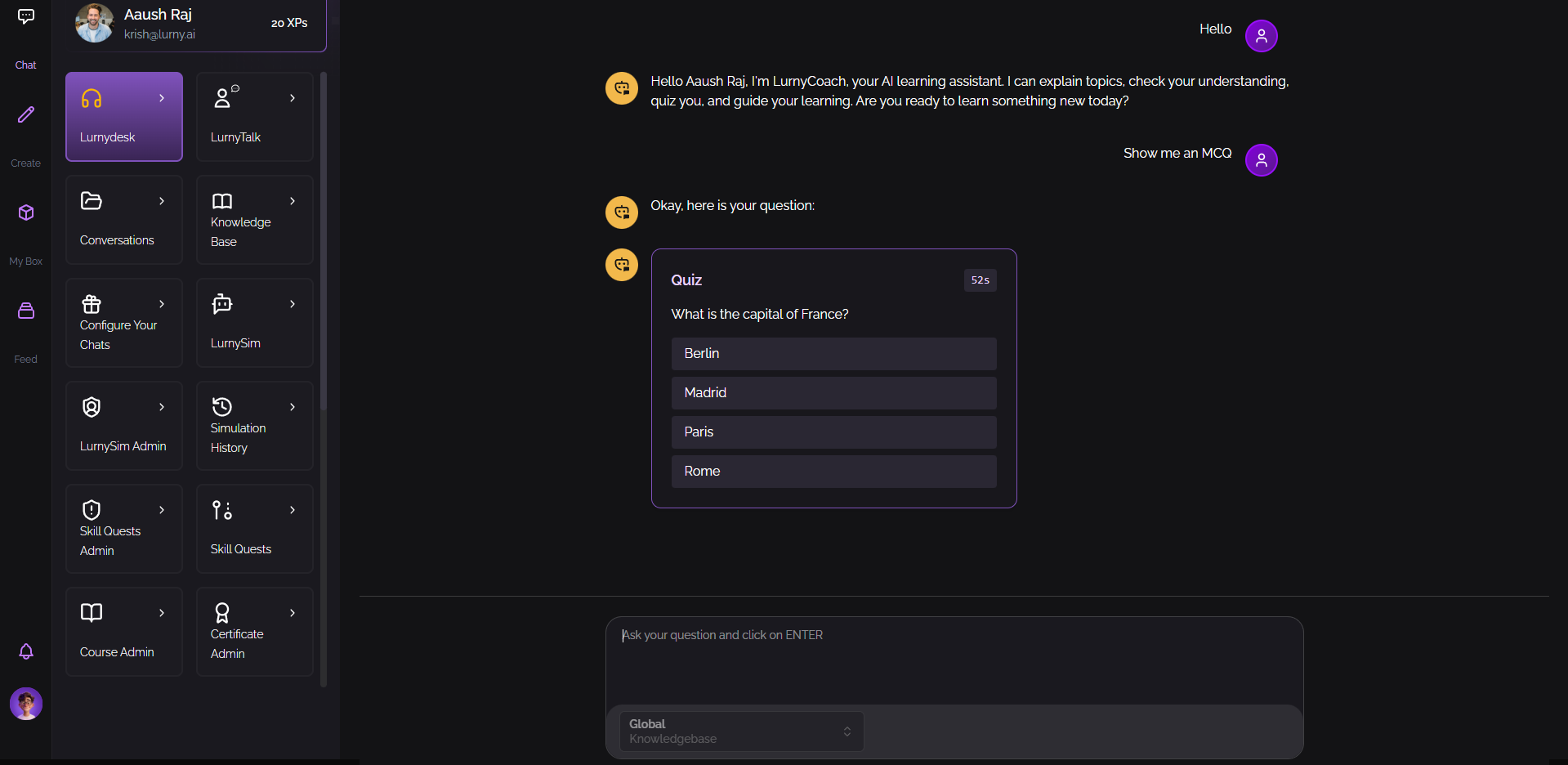
LurnyDesk: AI-Powered Text Learning Assistant
Overview
LurnyDesk is an intelligent text-based assistant that brings the power of AI conversations to your fingertips through a clean, intuitive chat interface. While LurnyTalk focuses on voice interactions, LurnyDesk provides the same powerful learning experience through text—perfect for situations where you prefer typing, need precise documentation, or want to review your learning conversations in writing.
Think of LurnyDesk as your personal AI tutor available through a chat window, similar to messaging a knowledgeable friend or colleague. Ask questions in natural language, get instant answers backed by your organization's knowledge base, and learn through interactive conversations that adapt to your needs.
The Problem It Solves
Many people learn better through reading and written communication. Some prefer text because it:
- Allows for careful review and reference
- Works well in quiet environments
- Provides a written record of learning
- Enables precise question-asking
- Supports multiple languages more easily
- Works well for people who prefer visual learning
However, traditional text-based learning still faces challenges:
- Search Overload: Knowing what to ask and where to find answers in vast document collections
- Lack of Context: Getting generic answers instead of information tailored to your specific situation
- No Active Engagement: Simply reading without interaction or confirmation of understanding
- Language Barriers: Struggling to learn when materials aren't in your preferred language
- Isolated Learning: Learning alone without someone to ask questions or clarify concepts
LurnyDesk solves these problems by providing an intelligent, text-based conversation partner that understands context, answers questions precisely, and actively engages you in the learning process.
Key Features
1. Natural Text Conversations
LurnyDesk provides a familiar chat interface where you type questions and receive detailed, thoughtful responses. The conversation feels natural and flowing, like messaging a knowledgeable colleague who's always available.
What this means for users: Ask questions exactly as you would to a person—no need to learn special search syntax or keywords. Type naturally, get human-like responses, and have a conversation that helps you learn step-by-step.
2. Knowledge Base Integration
Just like LurnyTalk, LurnyDesk connects to your organization's knowledge bases—company documents, training materials, course content, and more. When you ask a question, it searches through all relevant materials to provide accurate, contextual answers.
What this means for users: Instead of searching through hundreds of documents or files, simply ask your question in plain language. The assistant finds the relevant information and explains it clearly, saving you time and ensuring you get the right answers.
3. Source Citations and Document Viewing
One of LurnyDesk's powerful features is its ability to cite sources. When the assistant provides information, it can show you exactly where that information came from, complete with clickable links to view the original documents.
What this means for users: You can verify information, dive deeper into original sources, and see the full context behind any answer. This builds trust and allows you to explore topics in as much detail as you need.
4. Interactive Quizzes and Knowledge Checks
LurnyDesk doesn't just provide answers—it actively tests your understanding through interactive multiple-choice questions that appear right in the chat. This ensures you're truly learning, not just reading.
What this means for users: As you learn about topics, the assistant pauses to check your understanding with quick quizzes. This reinforces learning and helps you identify areas where you need more practice, all without leaving the conversation.
5. Complete Conversation History
Every conversation is automatically saved and searchable. You can review past discussions, reference previous explanations, and pick up where you left off in any conversation.
What this means for users: Never lose track of what you've learned. Review past conversations anytime, share them with others, or resume discussions seamlessly. Your learning history becomes a valuable reference resource.
6. Multilingual Support
LurnyDesk supports multiple languages, automatically detecting and responding in the language you're using. This breaks down language barriers and makes learning accessible to global teams.
What this means for users: Learn in the language you're most comfortable with, even if the original materials are in different languages. Perfect for international organizations and diverse learning environments.
7. Discussion Points Tracking
As you learn, LurnyDesk automatically identifies and tracks the key discussion points from your conversation. These become a summary of what you've covered, making review and reference easy.
What this means for users: Instead of manually taking notes, the system creates a learning summary for you. Quickly see what topics you've discussed, review key concepts, and identify areas you might want to revisit.
8. Clean, Focused Interface
The LurnyDesk interface is designed for clarity and focus. The chat window is easy to read, conversations flow naturally, and all features are easily accessible without clutter.
What this means for users: Focus on learning without distractions. The interface stays out of your way, letting you concentrate on the conversation and the content you're learning.
How It Works (Simplified)
Using LurnyDesk is as simple as having a conversation:
-
Open the Chat: Access LurnyDesk through your organization's platform—no special software or setup needed.
-
Choose Your Learning Context: Select which knowledge base or topic you want to learn about from a dropdown menu.
-
Start Typing: Ask any question in natural language. For example: "What are our company's policies on remote work?" or "Can you explain how the new expense reporting system works?"
-
Get Instant Answers: The assistant searches through relevant documents and provides a clear, comprehensive answer. If sources are available, you'll see citations you can click to view original documents.
-
Engage Actively: The assistant may ask you follow-up questions, provide quizzes to test understanding, or suggest related topics to explore.
-
Review and Reference: All conversations are saved automatically. You can search your history, review past discussions, and reference answers anytime.
The system handles all the complexity—understanding your questions, searching through knowledge bases, generating clear responses, and tracking your learning progress. You just type and learn.
Use Cases
Employee Onboarding
Scenario: A company needs to onboard new employees who need to learn about company policies, procedures, benefits, and culture.
How LurnyDesk Helps: New employees can ask questions as they come up during their first days and weeks. Instead of being overwhelmed with a stack of documents, they can search naturally: "How do I request time off?" or "What's our policy on flexible working hours?" The assistant provides accurate answers with links to official documents, making onboarding self-paced and comprehensive.
Technical Documentation Support
Scenario: Software developers or technical staff need quick answers about systems, APIs, or procedures without browsing through extensive documentation.
How LurnyDesk Helps: Ask specific technical questions and get precise answers with code examples and documentation links. "How do I authenticate with the API?" or "What's the error handling pattern for this service?" The assistant pulls from technical docs and provides clear, actionable answers.
Customer Service Training
Scenario: Customer service teams need to quickly find answers about products, policies, and procedures while helping customers.
How LurnyDesk Helps: Service representatives can ask questions in real-time during customer interactions. "What's the return policy for electronics?" or "How do I process a warranty claim?" They get accurate, up-to-date information instantly, improving service quality and response time.
Educational Course Support
Scenario: Students need help understanding course materials, preparing for exams, or getting clarification on assignments outside of class hours.
How LurnyDesk Helps: Students can ask questions about their coursework anytime, get explanations tailored to their level, and practice through interactive quizzes. The assistant adapts explanations to help each student understand concepts at their own pace.
Compliance and Policy Training
Scenario: Organizations need to ensure employees understand important policies, regulations, or compliance requirements.
How LurnyDesk Helps: Employees can ask questions about policies and get accurate answers with citations to official documents. The system can quiz them to verify understanding, and all interactions are logged for compliance purposes. Learning becomes interactive rather than passive reading.
Benefits
For Learners
- Convenience: Ask questions exactly when they arise, without waiting for office hours or scheduled training
- Precision: Get specific answers to your exact questions, not generic information
- Verification: See sources and citations, so you know answers are accurate and can explore further
- Review: Written conversations are easy to review, search, and reference later
- Self-Paced: Learn at your own speed, asking as many questions as needed without feeling rushed
- Language Flexibility: Use your preferred language for more comfortable learning
For Organizations
- Consistency: Every employee gets the same high-quality, accurate information
- Efficiency: Reduces time spent searching documents or waiting for human support
- Documentation: All learning interactions are logged, providing insights into what employees are learning and where they need more support
- Scalability: Support unlimited users simultaneously without additional resources
- Compliance: Detailed conversation logs help demonstrate that employees received and understood important information
- Knowledge Retention: Interactive learning and quizzing improve information retention compared to passive reading
Differences from LurnyTalk
While LurnyDesk and LurnyTalk share the same underlying intelligence, they serve different preferences and use cases:
LurnyTalk (Voice):
- Best for hands-free learning (commuting, walking, cooking)
- Natural for conversation and discussion
- Great for auditory learners
- Requires a quiet environment or headphones
LurnyDesk (Text):
- Best for precise questions and detailed answers
- Perfect for quiet environments
- Excellent for visual learners who prefer reading
- Provides written records automatically
- Better for technical or complex topics that need careful review
- Works well in shared spaces where voice isn't appropriate
Both tools access the same knowledge bases and provide the same quality of information—the choice between voice and text is simply about user preference and context.
Technology Highlights
LurnyDesk leverages advanced AI technologies to deliver its capabilities:
-
Natural Language Processing: Understands questions asked in natural, conversational language, not just keyword searches
-
Contextual Understanding: Maintains conversation context, so follow-up questions make sense and don't require repeating information
-
Intelligent Search: Quickly searches through vast knowledge bases to find the most relevant information for each question
-
Response Generation: Creates clear, well-structured answers that are easy to read and understand
-
Source Tracking: Automatically identifies and links back to original sources, enabling verification and deeper exploration
-
Adaptive Learning: Adjusts explanations and question complexity based on your responses and understanding level
The Future of Text-Based Learning
LurnyDesk represents the evolution of how we interact with information. Instead of searching through documents or waiting for human support, you can have an intelligent conversation that guides your learning.
This technology makes expertise accessible through the most natural form of written communication—conversation. Whether you're onboarding at a new company, learning technical skills, studying course materials, or just trying to understand complex information, LurnyDesk makes learning more interactive, engaging, and effective.
The combination of intelligent knowledge access, natural language understanding, source citations, and interactive engagement creates a learning experience that feels less like searching for information and more like having a knowledgeable conversation with someone who's always ready to help you understand and learn.
Impact and Results
Organizations using LurnyDesk typically see:
- Faster Onboarding: New employees become productive more quickly with instant access to answers
- Reduced Support Burden: Fewer questions directed to human support staff, freeing them for complex issues
- Better Information Retention: Interactive learning with quizzes improves long-term retention
- Higher Employee Satisfaction: Employees appreciate having immediate access to accurate information
- Improved Compliance: Clear audit trails show who learned what and when
- Time Savings: Employees spend less time searching for information and more time being productive
Conclusion
LurnyDesk transforms how people access and learn from organizational knowledge. By combining the familiarity of text messaging with the intelligence of AI, it creates a learning experience that's convenient, accurate, and engaging.
Whether you're a new employee learning the ropes, a student studying course materials, a professional staying current on policies, or anyone who needs quick access to accurate information, LurnyDesk provides a powerful, user-friendly solution that makes learning through text conversations effective and enjoyable.
The system doesn't replace human expertise or traditional documentation—it makes that knowledge more accessible and easier to understand, turning information into learning through the power of intelligent conversation.