
Iris Desktop AI: Intelligent Context-Aware Assistant
Native desktop AI companion that captures screen context automatically and provides instant, contextual help through voice or text—accessible anywhere with a simple keyboard shortcut.
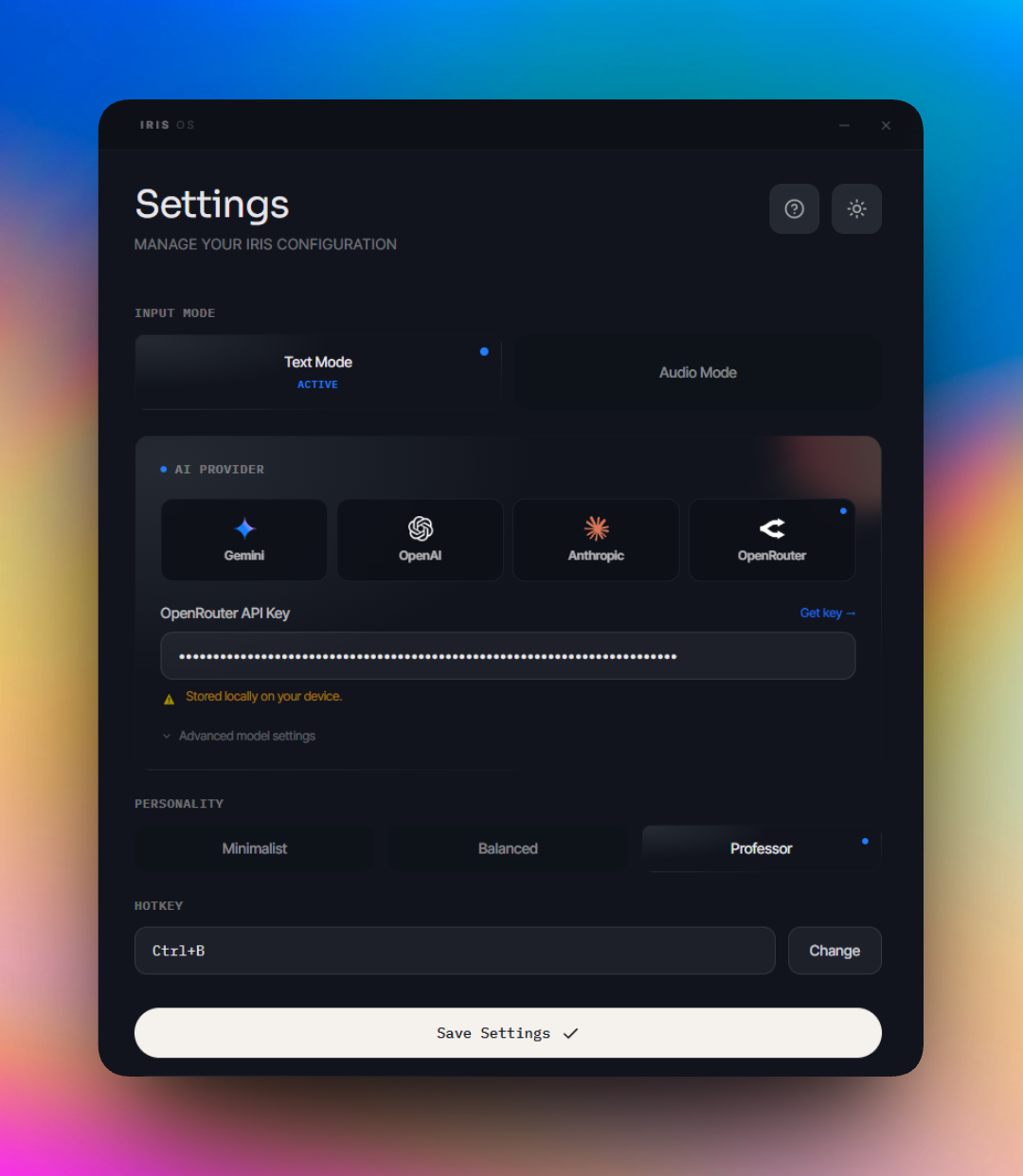
Iris Desktop AI: Intelligent Context-Aware Assistant
Overview
Iris is an intelligent desktop companion that brings AI assistance directly into your workflow through a simple keyboard shortcut. Unlike traditional AI assistants that require switching between applications or copying screenshots manually, Iris captures your screen context automatically and provides instant, contextual help wherever you're working.
The application addresses a fundamental challenge in modern computing: accessing AI assistance without disrupting your flow. Whether you're debugging code, reading documentation, or navigating complex interfaces, Iris appears at your cursor with relevant insights based on what's actually on your screen.
Built as a native desktop application using modern cross-platform technologies, Iris demonstrates sophisticated integration between system-level operations, real-time AI streaming, and polished user experience design.
The Challenge
Modern knowledge workers face several interconnected problems when trying to leverage AI assistance:
Context Loss and Manual Overhead: Traditional AI assistants require users to manually describe what they're seeing or copy-paste screenshots. This creates friction and often results in incomplete context, leading to less relevant responses.
Application Switching Costs: Moving between your work and an AI chat interface breaks concentration and slows productivity. Each context switch carries cognitive overhead, and the time spent navigating to a browser or separate application adds up across dozens of daily interactions.
Privacy and Security Concerns: Cloud-based AI assistants often require uploading sensitive information to external services. For professionals working with confidential data, this creates compliance risks and limits when AI assistance can be used.
Multimodal Input Complexity: Combining visual context (screenshots) with voice or text input requires coordinating multiple tools and services. No single solution elegantly handles the full spectrum of how users naturally want to interact with AI.
Cross-Platform Consistency: Users work across different operating systems and expect consistent experiences. Building truly native applications that work seamlessly on Windows, macOS, and Linux while maintaining a unified codebase presents significant technical challenges.
Key Features
1. Instant Activation with Global Hotkeys
The application registers system-wide keyboard shortcuts that work regardless of which application has focus.
How It Works: The system uses native operating system APIs to register global hotkeys that intercept keyboard events before they reach other applications. This low-level integration ensures Iris can respond instantly from any context.
Smart Features:
- Configurable hotkey combinations that don't conflict with existing shortcuts
- Debounced input handling to prevent accidental double-triggers
- Visual feedback through cursor changes and overlay indicators
- Graceful handling of permission requirements across different operating systems
What this means for users: Press a keyboard shortcut from anywhere—code editor, web browser, design tool—and Iris responds immediately without switching applications. No need to navigate menus or open windows. The AI is always one keystroke away.
2. Automatic Screen Context Capture
Rather than requiring manual screenshots or descriptions, Iris automatically captures your current screen when activated.
How It Works: The application uses platform-specific screen capture APIs to grab high-quality screenshots of your active display. These images are processed in-memory and sent directly to AI providers without ever being saved to disk.
Smart Features:
- Multi-monitor support with intelligent display selection
- Configurable capture quality to balance detail with performance
- In-memory processing eliminates disk I/O and privacy concerns
- Automatic image optimization for AI provider requirements
What this means for users: A developer debugging an error message can activate Iris and immediately get help without typing the error text. A designer reviewing a layout can get instant feedback on visual hierarchy. The AI sees exactly what you see, eliminating description overhead.
3. Multimodal Input: Voice and Text
Iris supports both typed text and voice input, allowing users to choose the most natural interaction method for their current situation.
How It Works: The application integrates multiple transcription services (OpenAI Whisper, ElevenLabs, Groq) to convert speech to text with high accuracy. Audio is captured using browser APIs, processed in real-time, and transcribed before being sent to the AI provider.
Smart Features:
- Automatic audio format negotiation across different platforms
- Visual recording indicators with cursor-following feedback
- Support for multiple transcription providers with different speed/accuracy tradeoffs
- Seamless fallback to text input if audio capture fails
What this means for users: Speak naturally to describe your problem or type when precision is needed. Voice input is particularly valuable when your hands are busy or when describing complex scenarios verbally is more efficient than typing.
4. Real-Time Streaming AI Responses
Instead of waiting for complete responses, Iris streams AI output token-by-token as it's generated.
How It Works: The application uses a provider-agnostic streaming architecture built on the Vercel AI SDK. As the AI generates each word or phrase, it's immediately transmitted to the UI and displayed.
Smart Features:
- Automatic scroll-following during streaming keeps the latest content visible
- User can scroll up to review earlier content without disrupting the stream
- Streaming indicators show when responses are still generating
- Intelligent buffering handles network variability and ensures smooth display
What this means for users: For long, detailed responses, streaming dramatically improves perceived performance. Users can start reading and processing information while the AI is still generating the rest of the response, effectively parallelizing human and machine processing time.
5. Multi-Provider AI Support
Rather than locking users into a single AI provider, Iris supports multiple leading AI services: Google Gemini, OpenAI, Anthropic Claude, and OpenRouter (which provides access to 300+ additional models).
How It Works: A provider abstraction layer normalizes differences between AI services, handling authentication, request formatting, and response parsing uniformly. The system automatically adapts to provider-specific capabilities.
Smart Features:
- Dynamic model selection with live model lists from provider APIs
- Automatic capability detection (which providers support images, audio, streaming)
- Intelligent fallback when preferred providers are unavailable
- Per-provider configuration with secure credential storage
What this means for users: Choose the AI provider that best fits your needs, preferences, or budget. Switch between providers seamlessly. Access cutting-edge models as they're released without waiting for application updates.
6. Conversational Context and Session Management
Iris maintains conversation history, allowing multi-turn interactions where the AI remembers previous exchanges.
How It Works: Each interaction creates or continues a session that stores the conversation history. When you reply to a response, the full context (previous questions, answers, and screenshots) is included in the next request.
Smart Features:
- Session goals displayed in the UI show the original question
- Exchange counters help users track conversation depth
- Keyboard shortcuts for quick replies or starting fresh sessions
- Automatic session expiration after periods of inactivity
- History limited to recent exchanges to manage token costs
What this means for users: Ask "What's wrong with this code?", receive an explanation, then follow up with "How would I fix it?" without re-explaining the context. The AI maintains awareness of the original screenshot and previous discussion.
7. Cursor-Following Floating UI
All Iris windows (input fields, loading indicators, response popups) appear at your cursor position rather than fixed screen locations.
How It Works: The application continuously tracks cursor position using system APIs and positions windows dynamically. Special handling ensures windows don't appear off-screen or in awkward positions.
Smart Features:
- Windows follow cursor movement during display for better positioning
- Automatic boundary detection prevents off-screen placement
- Focus management ensures keyboard input works immediately
- Transparent, borderless windows with custom styling for minimal visual disruption
What this means for users: The interface appears exactly where you're looking, minimizing eye movement and keeping the interaction close to your point of focus. No need to move your mouse to a specific screen area or search for windows.
8. Personality Customization
Users can configure the AI's response style across three personality modes: Minimalist (brief, direct answers), Balanced (clear, informative responses), or Professor (detailed, educational explanations).
How It Works: Each personality mode uses a carefully crafted system prompt that guides the AI's response style. These prompts are optimized for different scenarios: quick lookups versus deep learning, troubleshooting versus exploration.
Smart Features:
- Personality selection persists across sessions
- Different prompts optimized for text versus audio output
- Prompts designed to minimize unnecessary preamble and maximize useful content
- Context-aware response length matching input complexity
What this means for users: When quickly checking syntax, Minimalist mode provides just the code snippet. When learning a new concept, Professor mode provides comprehensive explanations with examples and context. Tailor the verbosity to match your current needs.
9. Secure Credential Management
API keys and configuration are stored using platform-specific secure storage mechanisms rather than plain text files.
How It Works: On Windows, credentials use the Windows Credential Manager; on macOS, the Keychain; on Linux, the Secret Service API. All sensitive data is encrypted at rest using OS-provided security infrastructure.
Smart Features:
- Platform-native security integration
- Encrypted storage for all API keys and tokens
- No plain text credentials in configuration files
- Automatic credential migration during updates
What this means for users: Your AI API keys are protected with the same security mechanisms that protect your system passwords. Even if someone gains access to your computer, they can't easily extract your credentials.
10. Cross-Platform Native Performance
Built using Tauri 2.0, Iris delivers truly native performance and capabilities while maintaining a single codebase across Windows, macOS, and Linux.
How It Works: Rust handles system-level operations (hotkeys, screen capture, cursor tracking) while React provides the UI. This architecture delivers native performance with minimal resource usage.
Smart Features:
- Native performance with typically under 50MB memory usage
- Platform-specific optimizations for each operating system
- Single codebase maintained across all platforms
- Automatic updates without app store requirements
What this means for users: Fast, responsive application that feels native to your operating system. Low resource usage means it runs smoothly alongside your other applications without slowing down your computer.
How It Works (Simplified)
Using Iris is straightforward:
-
Press Hotkey: Activate Iris from anywhere with a keyboard shortcut (default: Ctrl+Shift+Space).
-
Speak or Type: An input field appears at your cursor. Speak your question or type it.
-
Automatic Context: Iris captures your screen automatically—no manual screenshots needed.
-
AI Processing: Your question and screenshot are sent to your chosen AI provider.
-
Streaming Response: The answer appears in real-time at your cursor as the AI generates it.
-
Continue or Close: Reply to continue the conversation or press Escape to close.
The technology handles all the complexity—screen capture, audio transcription, AI provider communication, and window management. You focus on your question; Iris handles everything else.
Use Cases
Developer Debugging
Scenario: A developer encounters an error message they don't understand.
How Iris Helps: Press the hotkey, say "What does this error mean?", and Iris captures the error message automatically. Get an instant explanation without typing the error text or switching to a browser.
Learning New Tools
Scenario: A designer is learning a new design tool and doesn't understand a particular interface element.
How Iris Helps: Activate Iris while looking at the confusing interface, ask "What does this button do?", and get contextual help based on what's actually on screen.
Code Review Assistance
Scenario: A developer is reviewing code and wants to understand a complex function.
How Iris Helps: Highlight the code, activate Iris, and ask "Explain this function." The AI sees the code on screen and provides a detailed explanation without requiring copy-paste.
Documentation Navigation
Scenario: A developer is reading technical documentation and encounters an unfamiliar concept.
How Iris Helps: Activate Iris while viewing the documentation, ask for clarification, and get an explanation that references the specific documentation you're reading.
Quick Syntax Lookups
Scenario: A developer needs to remember the syntax for a specific operation.
How Iris Helps: Activate Iris, ask "How do I sort an array in JavaScript?", and get a quick code snippet without leaving your editor or opening a browser.
Benefits
For Developers
- Debug errors instantly by showing the error message and getting explanations
- Learn new APIs and frameworks with contextual help based on actual code
- Navigate unfamiliar codebases by asking questions about visible code
- Get syntax help and code examples without leaving the editor
- Understand complex error messages with AI-powered explanations
For Technical Professionals
- Navigate complex software interfaces with AI guidance
- Get instant help with command-line tools and terminal output
- Understand technical documentation with contextual explanations
- Troubleshoot system issues by showing error dialogs and logs
- Learn new tools and workflows with interactive assistance
For Power Users
- Access AI assistance without disrupting workflow or switching applications
- Maintain privacy by controlling which AI provider receives data
- Customize response style to match different use cases
- Use voice input when typing is inconvenient
- Build conversational context for complex problem-solving
For Organizations
- Deploy a consistent AI assistance tool across different platforms
- Maintain control over AI provider selection and data handling
- Enable employees to work more efficiently with contextual help
- Reduce time spent on routine questions and lookups
- Support learning and skill development with on-demand assistance
Technology Highlights
Iris leverages cutting-edge technologies for performance and reliability:
- Cross-Platform Native Architecture: Tauri 2.0 combines Rust for system operations with React for UI
- Real-Time Streaming: Event-driven architecture coordinates multiple windows with smooth token streaming
- Provider-Agnostic AI: Abstraction layer supports multiple AI providers with unified interface
- Secure Credential Storage: Platform-specific secure storage for API keys and configuration
- Advanced Focus Management: Sophisticated window focus handling across different operating systems
- Intelligent Window Lifecycle: Multiple specialized windows with coordinated creation and positioning
- Performance Optimization: Minimal resource usage with instant responsiveness
Real-World Impact
The platform delivers measurable results:
- Performance: Hotkey response under 100ms, first token typically 500-1500ms
- Scale: Supports 4+ AI providers with 300+ models through OpenRouter
- Features: 2 input modes (text/voice), 3 personality configurations, multi-monitor support
- Quality: Type-safe architecture, comprehensive error handling, secure credential storage
- Cross-Platform: Native performance on Windows, macOS, and Linux from single codebase
What This Demonstrates
This project showcases expertise in:
- Full-Stack Desktop Development: Native desktop application combining Rust and modern web technologies
- Real-Time Systems Architecture: Event-driven streaming with careful timing and coordination
- Cross-Platform Engineering: Truly native applications across different operating systems
- AI Integration Expertise: Practical implementation of modern AI APIs with streaming and multimodal input
- Systems Programming: Low-level OS integration for hotkeys, screen capture, and focus management
- Security-Conscious Development: Secure credential storage and privacy-focused architecture
- User Experience Design: Thoughtful interaction design with cursor-following windows and streaming feedback
- Performance Engineering: Optimization for minimal resource usage and instant responsiveness
- API Design and Abstraction: Clean abstraction layers hiding complexity while preserving flexibility
- Production-Ready Development: Comprehensive error handling, configuration management, and user feedback
Challenges Overcome
Cross-Platform Focus Management
Focus management is notoriously difficult in cross-platform applications, especially with floating windows. Implemented platform-specific APIs with retry logic and movement-based focus restoration to ensure reliable keyboard input.
Real-Time Streaming Coordination
Coordinating multiple independent windows (main application, loading spinner, response popup) through a message-passing system required careful event-driven design to ensure smooth, real-time updates without blocking or race conditions.
Provider Abstraction Complexity
AI providers have different APIs, authentication methods, and capabilities. Created an abstraction layer that handles these differences transparently while preserving provider-specific optimizations.
System-Level Integration
Integrating with operating system APIs for hotkeys, screen capture, and cursor tracking required platform-specific code and careful handling of permission requirements across different operating systems.
Conclusion
Iris represents a sophisticated integration of modern technologies to solve a real problem: making AI assistance truly accessible within existing workflows. The project demonstrates not just technical implementation skills, but thoughtful product design that prioritizes user experience, performance, and security.
The architecture showcases several advanced concepts: real-time streaming systems, cross-platform native development, provider abstraction, and system-level integration. Each technical decision was made with careful consideration of tradeoffs between performance, maintainability, and user experience.
What makes this project particularly valuable is its focus on the complete user experience. Rather than simply exposing AI capabilities, Iris thoughtfully integrates them into natural workflows with minimal friction. The cursor-following UI, automatic context capture, and streaming responses all contribute to an experience that feels immediate and natural.
The technical implementation demonstrates production-ready software engineering: comprehensive error handling, secure credential management, performance optimization, and cross-platform compatibility. The codebase is structured for maintainability and extensibility, with clear abstractions that allow adding new providers or features without major refactoring.
Ultimately, Iris shows how thoughtful engineering and user experience design can transform powerful AI capabilities into a tool that genuinely enhances productivity.