
Gradienty: Design Tools Platform (40K+ Monthly Users)
Comprehensive design tools platform with palette visualizer, animated icons, pattern backgrounds, and gradient generators used by 40,000+ developers monthly.
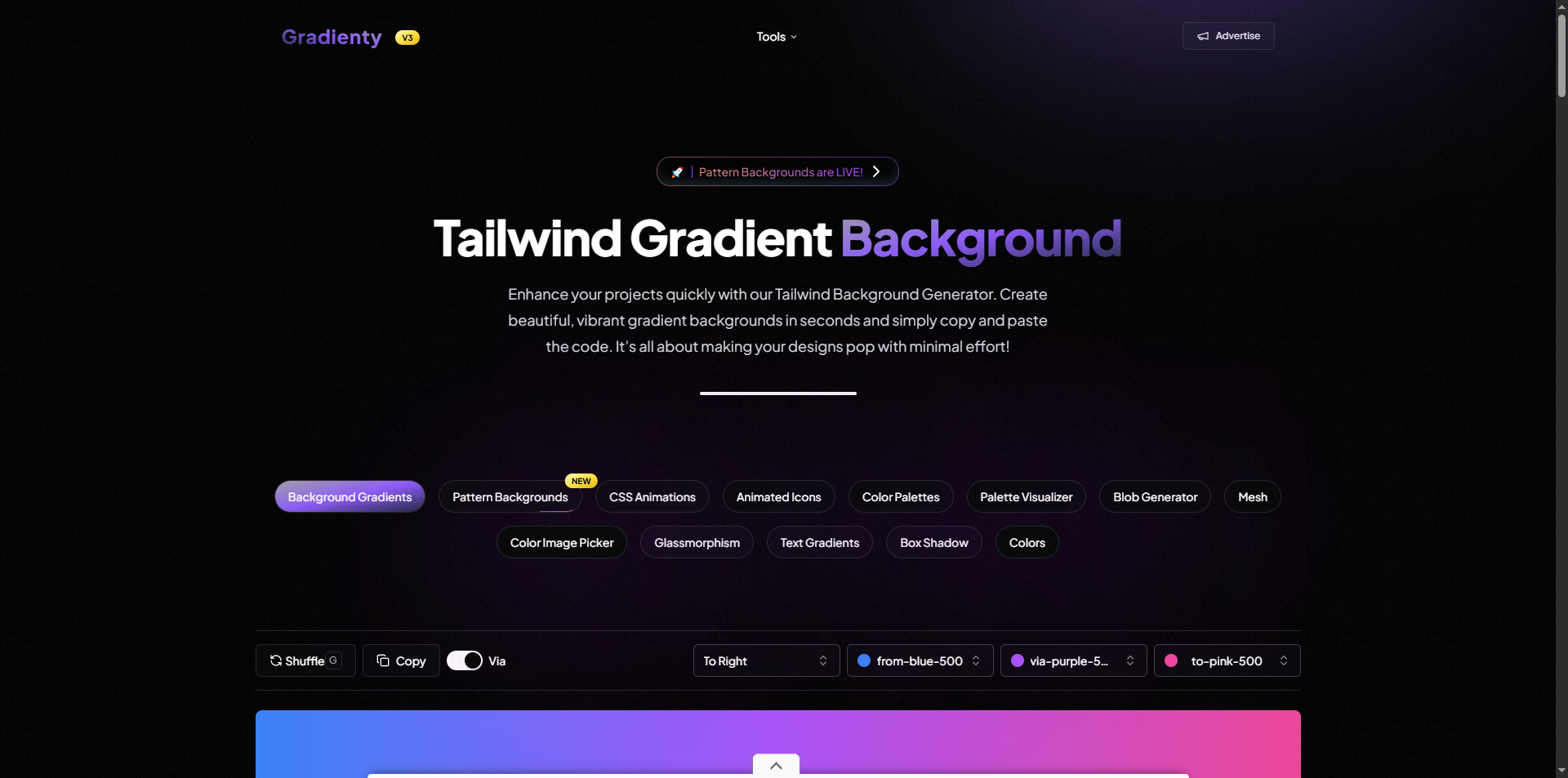
Gradienty - Design Tools Platform
Overview
Gradienty is a comprehensive design tools platform that empowers developers and designers to create stunning visual elements for their projects. With over 40,000 developers using the platform every month, Gradienty has become an essential resource for anyone looking to add beautiful gradients, patterns, animations, and color schemes to their work.
The platform offers a suite of intelligent, user-friendly tools that transform complex design tasks into simple, one-click solutions. Each tool has been carefully crafted to understand what users need and provide instant, ready-to-use results.
Core Tools & Features
1. Palette Visualizer - See Your Colors Come to Life
The Palette Visualizer is one of Gradienty's most innovative tools. Instead of guessing how colors will look together, this tool lets you see your entire color scheme applied to a real website in real-time.
How It Works Intelligently:
When you select or create a color palette, the system doesn't just show you swatches—it builds an entire preview website using your colors. The tool automatically determines whether your palette works better on a light or dark background by analyzing the brightness of your primary color. It then generates complementary text colors, background variations, and accent colors that work harmoniously together.
The visualizer creates a complete preview with navigation bars, buttons, cards, and text—all styled with your chosen colors. You can see exactly how your palette will look in a real project before you write a single line of code. The tool even checks that your colors meet accessibility standards, ensuring text is readable and meets professional design guidelines.
What makes it truly special is that every color you choose automatically generates dozens of variations at different opacity levels. This means you get a complete color system, not just a few colors. The tool understands color relationships and creates harmonious variations that designers would typically spend hours calculating manually.
User Experience:
Users can browse through hundreds of curated palettes organized by themes like "Nature," "Sunset," "Neon," or "Vintage." They can also create custom palettes by picking colors manually or uploading an image to extract colors from. Once satisfied, they can share their palette with a simple link, making collaboration effortless.
2. Animated Icons - Professional Animations Made Simple
The Animated Icons tool solves a common problem: finding beautiful, professional animated icons that are easy to use. Most animated icons require complex setup or expensive licenses. Gradienty makes them free and instantly usable.
How It Works Intelligently:
Each icon is built as a lightweight SVG file with smooth animations that activate on hover. The system includes a powerful search feature that helps users find exactly what they need from a collection of hundreds of icons. The search understands what users are looking for—searching for "download" will show download-related icons, "user" shows user icons, and so on.
The icons are designed to be copy-paste ready. When you find an icon you like, you can copy the code with one click. The code is clean, well-formatted, and ready to drop into any project. No configuration needed, no dependencies to install—just copy and use.
The animations themselves are carefully crafted. Each icon has a unique animation that makes sense for that icon. A bike icon has wheels that rotate, a clock icon has hands that move, and a loading icon pulses smoothly. The animations are subtle and professional, adding life to interfaces without being distracting.
User Experience:
Users browse through a visually stunning grid of animated icons. They can search by keyword, preview animations by hovering, and instantly copy the code. The tool also allows downloading all icons at once, making it perfect for projects that need multiple icons. Each icon is customizable—users can change colors, sizes, and stroke widths to match their design system.
3. Pattern Backgrounds - Hundreds of Beautiful Patterns
Pattern Backgrounds transforms the tedious task of creating background patterns into a delightful browsing experience. Instead of writing complex CSS code, users can browse hundreds of professionally designed patterns and copy the code with a single click.
How It Works Intelligently:
The tool organizes patterns into intuitive categories: "Color Flows" for gradient-based patterns, "Shape Designs" for geometric patterns, "Artistic Styles" for decorative patterns, and "Visual Effects" for special effects. Each pattern is carefully crafted to work well as a background, with appropriate contrast and visual weight.
The system automatically generates the complete code for each pattern, including all the CSS needed to implement it. The code is clean, commented, and follows best practices. Users don't need to understand how the pattern works technically—they just copy and paste.
Each pattern card shows a live preview, so users can see exactly how the pattern looks before copying. The previews are large enough to see details but optimized to load quickly. When users hover over a pattern, they get options to preview it full-screen or copy the code immediately.
User Experience:
Users scroll through a beautiful grid of pattern previews. Each pattern is clearly labeled with its category and shows a live preview. Clicking a pattern copies the code to the clipboard instantly, with a satisfying confirmation animation. Users can also preview patterns in a full-screen dialog to see how they look at different sizes. The tool includes patterns for every style—from subtle grids perfect for dashboards to bold gradients ideal for hero sections.
4. Blob Generator - Unique Organic Shapes
The Blob Generator creates organic, fluid shapes that are perfect for modern web design. These shapes, called "blobs," are popular in contemporary design but are typically difficult to create manually.
How It Works Intelligently:
The generator uses mathematical algorithms to create unique blob shapes every time. Users control three key parameters: complexity (how many points the blob has), randomness (how irregular the shape is), and smoothness (how curved the edges are). As users adjust these sliders, the blob updates in real-time, showing exactly what they'll get.
The system generates SVG code, which means the blobs are scalable vector graphics that look perfect at any size. The code is optimized and ready to use. Users can customize the color, download the blob as an SVG file, or copy the code directly.
What makes it intelligent is the randomization feature. With one click, users can generate a completely new, unique blob shape. The system ensures each random blob is visually interesting and usable, not just a random mess of points. The algorithm balances randomness with aesthetic appeal.
User Experience:
Users see a large preview of their blob that updates instantly as they adjust controls. Three intuitive sliders let them fine-tune the shape to their liking. A color picker lets them choose any color. When they're happy, they can copy the code, download the SVG, or randomize to try something new. The interface is clean and focused, making it easy to create the perfect blob without distractions.
5. CSS Animations Generator - Bring Elements to Life
The CSS Animations Generator is a powerful tool that makes creating professional animations accessible to everyone. Instead of writing complex keyframe animations from scratch, users can choose from dozens of animation types and customize them with intuitive controls.
How It Works Intelligently:
The tool offers animations organized into logical categories: Basic animations (scale, rotate, slide), Attention grabbers (vibrate, shake, pulse), Fade effects, and Background animations. Each animation type has been carefully crafted to work smoothly and look professional.
Users can preview animations in real-time on different object types—boxes, text, badges, or blobs. The tool provides complete control over timing, easing functions, direction, and iteration count. As users adjust settings, they see the animation update instantly, so there's no guessing about how it will look.
The system generates clean, production-ready CSS code that includes all the keyframes and animation properties. Users can copy the code and use it immediately in their projects. The tool also includes a curated collection of pre-made animations for users who want something ready to use right away.
User Experience:
Users select an animation type from organized categories, then fine-tune it with sliders and dropdowns. They can play, pause, and reset the animation to see exactly how it behaves. The preview updates in real-time, showing the animation on different object types. When satisfied, one click copies all the CSS code needed, including keyframes and animation properties.
6. Background Gradients - Stunning Visual Effects
The Background Gradients tool makes creating beautiful gradient backgrounds effortless. Users can browse hundreds of pre-made gradients or create custom ones with an intuitive color picker.
How It Works Intelligently:
The tool includes a vast library of carefully curated gradients, each designed to look professional and work well as backgrounds. Users can filter gradients by color, making it easy to find gradients that match their brand or design theme.
For custom gradients, the tool provides an intuitive interface with color pickers for start, middle (optional), and end colors. Users can choose from multiple gradient directions—horizontal, vertical, diagonal, or radial. The system generates both Tailwind CSS classes and plain CSS, so it works with any project setup.
The tool intelligently converts colors between formats, ensuring compatibility. It also provides a "randomize" feature that generates beautiful, harmonious gradients automatically, perfect for inspiration or quick prototypes.
User Experience:
Users browse a beautiful grid of gradient previews, each showing the full gradient effect. They can filter by color, randomize for inspiration, or create custom gradients with the color picker. Clicking any gradient copies the code instantly. The tool shows both Tailwind and CSS versions, so users can choose what works best for their project.
7. Text Gradients - Eye-Catching Typography
Text Gradients applies beautiful gradient effects to text, making headlines and important text stand out. The tool provides full control over colors, direction, and intensity.
How It Works Intelligently:
The tool understands that text gradients need to be readable and impactful. It provides controls for gradient direction, color stops, and intensity. Users can create two-color or three-color gradients, with full control over where each color appears.
The system generates clean CSS that uses modern techniques like background-clip: text to create the gradient effect. It ensures the code works across all modern browsers and provides fallbacks for better compatibility.
User Experience:
Users select colors and adjust the gradient direction with simple controls. They see a live preview of their text with the gradient applied. The tool generates ready-to-use CSS that can be applied to any text element. Perfect for hero sections, call-to-action buttons, and attention-grabbing headlines.
8. Box Shadow Generator - Add Depth and Dimension
The Box Shadow Generator creates realistic shadows that add depth and dimension to UI elements. Instead of guessing shadow values, users can see exactly what they're creating.
How It Works Intelligently:
The tool provides visual sliders for every aspect of a shadow: horizontal offset, vertical offset, blur radius, spread radius, and color with opacity control. As users adjust any slider, they see the shadow update in real-time on a preview element.
The system generates both Tailwind CSS classes and plain CSS, so it works with any framework. It also includes an "inset" option for inner shadows, which are useful for pressed button effects or inset panels.
User Experience:
Users adjust sliders to position, blur, and color their shadow while watching a live preview. They can toggle between outer and inner shadows, adjust opacity, and randomize for inspiration. One click copies the complete shadow code, ready to use in any project.
9. Glassmorphism Generator - Modern Glass Effects
The Glassmorphism Generator creates the trendy "glass" effect that's popular in modern UI design. This effect makes elements look like frosted glass, with blur, transparency, and subtle borders.
How It Works Intelligently:
The tool provides precise controls for every aspect of the glass effect: backdrop blur, opacity, saturation, contrast, and optional noise texture. Users can see their glass effect applied to different background colors and patterns, ensuring it works in their specific context.
The system generates complete CSS that includes all the backdrop filters and styling needed. It also provides options for adding subtle noise textures that make the glass effect look more realistic and less flat.
User Experience:
Users adjust sliders for blur, opacity, and other effects while seeing a live preview. They can test the glass effect against different background colors and even upload custom backgrounds. The tool generates complete, production-ready CSS that creates the glassmorphism effect perfectly.
10. Color Palette Generator - Thousands of Curated Palettes
The Color Palette Generator provides access to thousands of professionally curated color palettes, organized by theme, mood, season, or style.
How It Works Intelligently:
The tool includes palettes from over 20 different categories: Nature, Sunset, Neon, Vintage, Coffee, Christmas, Wedding, and many more. Each palette contains four to five harmonious colors that work well together.
The system organizes palettes intelligently, making it easy to find colors that match a specific mood or theme. Users can browse by category or search for palettes. Each palette includes descriptive color names, making it easy to understand the palette's character.
User Experience:
Users browse through beautifully organized categories, each containing dozens of curated palettes. They can see all colors in a palette at a glance, copy individual colors or entire palettes, and export palettes in various formats. The tool makes finding the perfect color scheme effortless.
11. Color Picker from Image - Extract Colors Instantly
The Color Picker from Image tool extracts color palettes from any image, making it easy to match website colors to brand images, photos, or designs.
How It Works Intelligently:
Users can upload their own images or browse Unsplash's library of high-quality photos. The tool uses advanced color extraction algorithms to identify the most prominent and harmonious colors in an image. It doesn't just pick random pixels—it analyzes the image to find colors that represent the image's overall palette.
The system extracts multiple colors (typically 4-8) that work well together, creating a cohesive palette from the image. It also finds similar palettes from the curated collection, helping users discover related color schemes.
User Experience:
Users upload an image or select one from Unsplash. Within seconds, they see a palette of extracted colors displayed as swatches. They can copy individual colors or export the entire palette. The tool also shows similar palettes, helping users explore variations and find the perfect match for their project.
12. Mesh Gradients - Complex Multi-Color Blends
Mesh Gradients create complex, organic-looking gradients by blending multiple colors at different positions. These gradients are more sophisticated than simple linear or radial gradients.
How It Works Intelligently:
The tool allows users to place multiple color stops at different positions on a canvas. Each color creates a radial gradient that blends with others, creating smooth, organic color transitions. Users can control the position and color of each stop, creating unique gradient effects.
The system generates CSS that uses multiple radial gradients layered together, creating the mesh effect. It also provides a curated collection of pre-made mesh gradients for users who want something ready to use.
User Experience:
Users place color stops on a canvas and adjust their positions and colors. They see the mesh gradient update in real-time as they make changes. The tool generates complete CSS code that creates the complex gradient effect. Perfect for hero sections, backgrounds, and modern design elements.
13. Tailwind Colors - Complete Color Reference
The Tailwind Colors tool provides a comprehensive reference for all Tailwind CSS colors, making it easy to find and use the right colors in Tailwind projects.
How It Works Intelligently:
The tool displays all Tailwind color families (red, blue, green, etc.) with all their shades (50, 100, 200, etc.). Each color shows its hex code, making it easy to copy and use. The interface is organized clearly, so users can quickly find the color they need.
User Experience:
Users browse through color families, see all available shades, and click any color to copy its hex code. The tool makes it easy to find the perfect Tailwind color without searching through documentation. Essential for developers working with Tailwind CSS.
Technical Excellence
While Gradienty is designed to be simple for users, it's built with sophisticated technology under the hood. The platform uses modern web technologies to ensure fast loading, smooth interactions, and reliable performance. All tools work entirely in the browser, so there's no server processing delay—everything happens instantly.
The code generated by each tool is production-ready. It follows best practices, is well-formatted, and includes helpful comments. Developers can use the code directly in their projects without modification.
Impact & Usage
Gradienty serves over 40,000 developers every month, making it one of the most popular design tool platforms available. The tools save countless hours of work by automating complex design tasks. What would take a designer hours to create manually can be done in seconds with Gradienty.
The platform is completely free to use, with no sign-ups required and no usage limits. This accessibility has made it a go-to resource for developers at startups, agencies, and large companies alike.
Design Philosophy
Every tool in Gradienty follows the same philosophy: make complex things simple. The interface is clean and uncluttered. Controls are intuitive and self-explanatory. Results are instant and visual. Users don't need to read documentation or watch tutorials—they can start creating immediately.
The tools are designed to understand what users want to accomplish, not just what they ask for. The Palette Visualizer doesn't just show colors—it shows how they work together. The Blob Generator doesn't just create shapes—it creates beautiful, usable shapes. The Pattern Backgrounds tool doesn't just list patterns—it organizes them in a way that helps users find what they need.
Conclusion
Gradienty represents a new approach to design tools: intelligent, user-friendly, and powerful. By combining sophisticated algorithms with thoughtful user experience design, the platform makes professional-quality design elements accessible to everyone. Whether you're a seasoned designer or a developer who just needs a quick gradient, Gradienty has the tools to help you create something beautiful.
The platform continues to grow and evolve, adding new tools and features based on user feedback. With 40,000+ monthly users and counting, Gradienty has proven that great design tools don't need to be complicated—they just need to work beautifully.