
ForgeForms: Complete Visual Form Builder & React Library
Complete form builder solution with visual form creation, React library integration, and automatic submission management with spam protection.
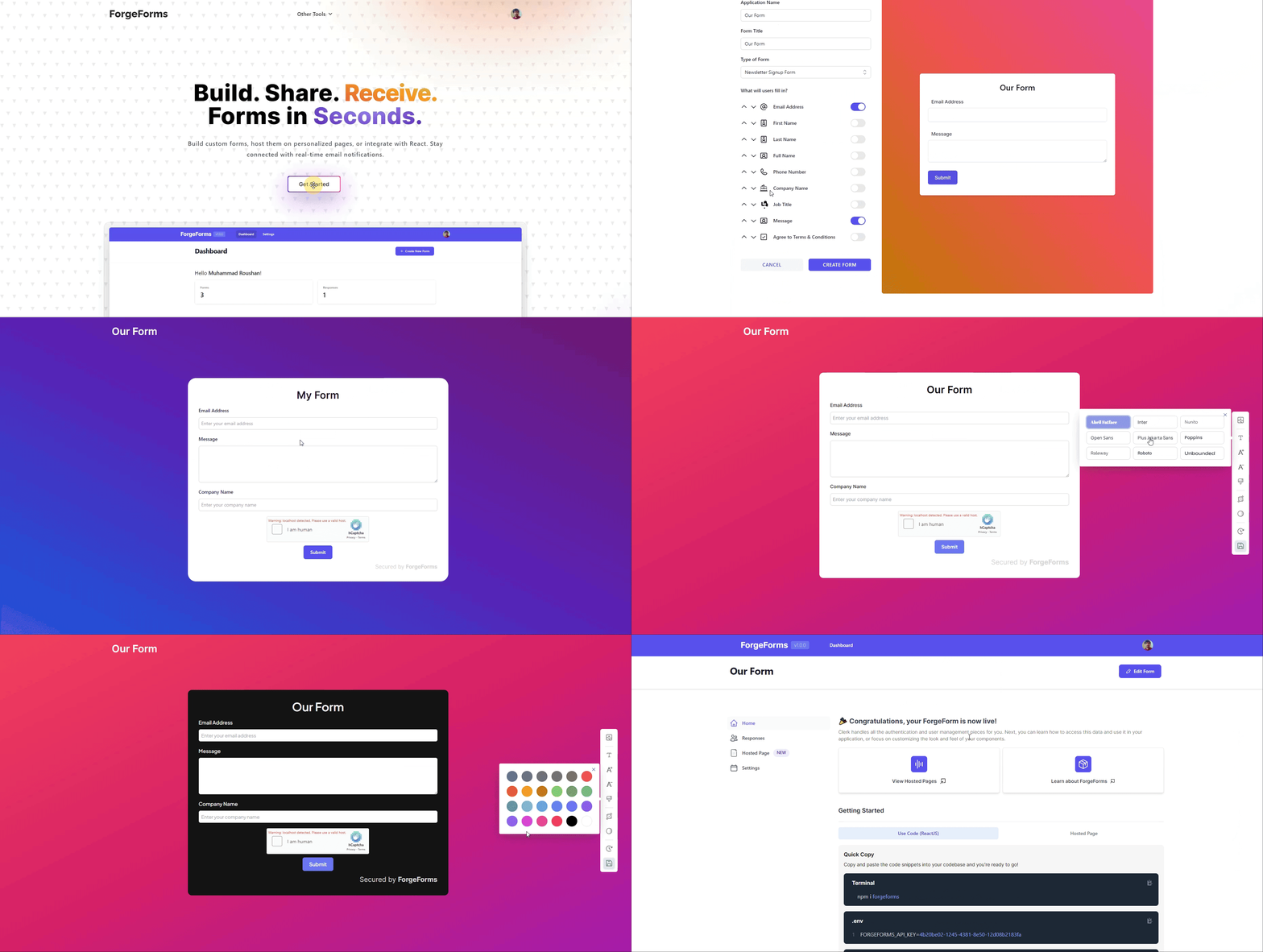
ForgeForms: A Complete Form Builder Solution
The Challenge
Building forms for websites has always been a tedious process. Developers spend hours writing code for each form field, setting up validation rules, styling inputs, handling submissions, and ensuring everything works correctly. For businesses and individuals who need forms but lack technical expertise, this creates a significant barrier. They either have to hire developers for every form they need, or struggle with complex form builders that require extensive setup.
The Solution
ForgeForms is a complete form creation and management system that solves this problem elegantly. It's a React library that allows developers to add fully functional, customizable forms to their applications with just a few lines of code. But more importantly, it connects to a backend system where users can visually design their forms without writing any code at all.
How It Works
For End Users: Visual Form Creation
Users can create forms through a simple web interface (the ForgeForms platform). They can:
- Add different field types: Text inputs, email fields, number fields, text areas for longer responses, dropdown menus, and checkboxes
- Customize each field: Set labels, placeholders, and determine which fields are required
- Arrange fields: Control the order in which fields appear on the form
- Set up validation: Automatically validate email addresses and ensure required fields are filled
- Add security: Built-in spam protection through hCaptcha integration
- Receive submissions: All form submissions are automatically collected and can be sent to their email
Once a form is created, users receive a unique API key. This key is like a password that connects their form design to wherever they want to display it.
For Developers: Simple Integration
Developers can add any ForgeForms form to their React application with minimal effort:
- Install the ForgeForms package (one command)
- Import the component
- Add a single line of code with the API key
- The form automatically appears, fully styled and functional
The form automatically:
- Loads the field configuration from the server
- Displays all fields in the correct order
- Handles user input and validation
- Submits data securely to the backend
- Shows helpful error messages when validation fails
- Provides a smooth, professional user experience
Key Features
Multiple Field Types
The system supports all common form field types:
- Text fields: For names, addresses, and other short text
- Email fields: With automatic email format validation
- Number fields: For numeric input like quantities or ages
- Text areas: For longer responses like comments or messages
- Dropdown menus: For selecting from predefined options
- Checkboxes: Including special handling for terms and conditions
Smart Validation
Forms automatically validate user input:
- Email addresses are checked for proper format
- Required fields cannot be left empty
- Terms and conditions must be accepted before submission
- All errors are displayed clearly to help users correct their input
Professional Design
Every form comes with:
- Clean, modern styling using the Inter font family
- Consistent spacing and layout
- Smooth transitions and hover effects
- Focus states for accessibility
- Responsive design that works on all devices
- Customizable appearance through CSS classes
Security Features
- hCaptcha integration: Protects forms from spam and automated submissions
- Secure data transmission: All form data is sent over encrypted connections
- Server-side validation: Additional validation happens on the server for extra security
User Experience Enhancements
- Loading states: Skeleton screens show while the form is loading, preventing jarring layout shifts
- Error handling: Clear, user-friendly error messages guide users to fix issues
- Success feedback: Forms reset after successful submission, ready for the next entry
- Accessibility: Proper labels, focus management, and keyboard navigation support
Technical Architecture
Frontend Components
The library is built with React and consists of modular components:
- ForgeForms: The main component that orchestrates everything
- ForgeField: Handles text, email, number, and textarea inputs
- ForgeSelect: Manages dropdown menus with custom options
- ForgeCheckbox: Handles checkbox inputs, especially for terms and conditions
- ForgeSubmit: The submit button with consistent styling
Each component is designed to be reusable and customizable while maintaining consistent behavior.
Backend Integration
The system connects to a REST API that:
- Stores form configurations in a database
- Retrieves form designs when requested
- Validates hCaptcha tokens
- Processes and stores form submissions
- Sends email notifications to form owners
Build System
The project uses modern build tools:
- Vite: For fast development and optimized production builds
- React: For building interactive user interfaces
- Modular architecture: Components can be used independently or together
The library is packaged so it can be:
- Installed via npm (Node Package Manager)
- Used in any React application
- Customized with CSS classes
- Extended with additional functionality
Real-World Applications
ForgeForms can be used for:
- Contact forms: Let visitors reach out directly from your website
- Newsletter signups: Collect email addresses for marketing
- Survey forms: Gather feedback and opinions
- Registration forms: Sign up users for events or services
- Feedback forms: Collect customer reviews and suggestions
- Application forms: Accept job applications or program registrations
The Development Process
Creating ForgeForms required solving several challenges:
1. Dynamic Form Rendering
The system needed to render different field types based on configuration data from the server. This was achieved by creating a flexible component system that can switch between field types dynamically.
2. State Management
Forms need to track multiple pieces of information:
- Current values in each field
- Validation errors
- Loading states
- Submission status
React's state management system handles all of this efficiently, ensuring forms respond instantly to user input.
3. Validation Logic
Different field types require different validation:
- Email fields need format checking
- Required fields need presence checking
- Checkboxes need special handling for terms and conditions
The validation system provides immediate feedback while users type, improving the overall experience.
4. Error Handling
The system gracefully handles various error scenarios:
- Network failures when loading form data
- Validation errors when submitting
- Server errors during submission
Users always see clear, helpful messages instead of technical error codes.
5. Performance Optimization
The library is optimized for:
- Fast initial load times
- Smooth interactions
- Minimal bundle size
- Efficient re-rendering
This ensures forms feel responsive and don't slow down websites.
Customization and Flexibility
While ForgeForms works out of the box with beautiful default styling, it's designed to be customizable:
- CSS classes: All components use consistent class naming, making it easy to override styles
- Custom styles: Developers can pass custom CSS to individual components
- Component composition: The modular design allows for extending functionality
- API flexibility: The backend API can be extended to support new field types or features
Security and Privacy
Security was a priority throughout development:
- API key authentication: Each form is protected by a unique key
- hCaptcha verification: Prevents automated spam submissions
- Server-side validation: Double-checks all data before processing
- Secure data transmission: All communication uses encrypted connections
- Privacy-conscious: Form owners control where their data goes
The Result
ForgeForms successfully bridges the gap between non-technical users who need forms and developers who want to implement them quickly. It provides:
- Ease of use: Non-technical users can create forms visually
- Developer-friendly: Simple integration for developers
- Professional quality: Forms look and work like they were custom-built
- Reliability: Robust error handling and validation
- Scalability: Can handle forms of any complexity
- Maintainability: Clean, modular code that's easy to update and extend
Impact and Future Potential
This project demonstrates the ability to:
- Understand user needs from multiple perspectives (end users and developers)
- Design systems that are both powerful and easy to use
- Build reusable components that work together seamlessly
- Integrate third-party services (hCaptcha, email) effectively
- Create solutions that solve real-world problems
The architecture allows for future enhancements like:
- Additional field types (file uploads, date pickers, etc.)
- Advanced validation rules
- Custom styling themes
- Analytics and reporting
- Multi-step forms
- Conditional field display
Conclusion
ForgeForms represents a complete solution to a common web development challenge. By combining a user-friendly form builder with a developer-friendly library, it eliminates the traditional barriers to creating and implementing forms. The project showcases skills in full-stack development, user experience design, API integration, and creating tools that empower both technical and non-technical users.
Whether you're a business owner who needs a contact form, a developer building a client's website, or someone creating a personal project, ForgeForms makes the process simple, fast, and reliable.